Documentation
Dial
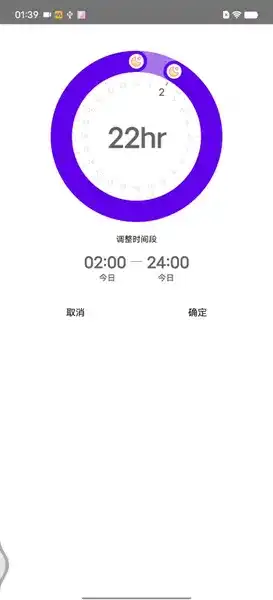
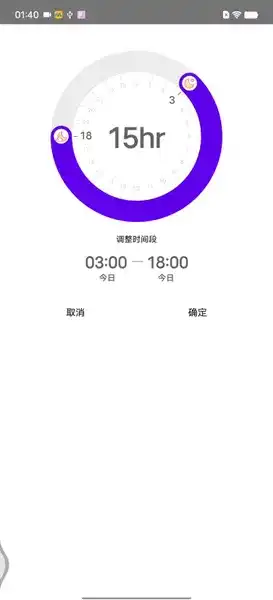
Customize the dial-style time selection range selector, you can customize the style, select the time interval, etc., and also support the edit mode
自定义表盘式时间选择范围选择器,可自定义样式、可选择时间区间等,同时也支持编辑模式
- Setting selection range 0~24 points
- 设置选择范围 0~24 点


* Setting selection range 3~18 points
* 设置选择范围 3~18 点

Steps for usage
使用步骤
Since the specific constraints have been set in DialView.kt, it is quite simple to use, just construct a DialView class:
由于具体约束都在 DialView.kt 中已设置,使用相当简单,只需要构造一个DialView类即可:
Specific configuration modification can refer to the source code
具体配置修改可参看源代码
DialView(start = 10, end = 3, editType = TimeEditType.EDIT, modifier = Modifier)
If you find it useful, give a star, a little encouragement, thank you
觉得有用,给个star,小小鼓励,谢谢啦🙏
If you don’t understand, or have questions, suggestions, etc., you are welcome to make bricks, Issues or contact directly:
如果有不明白��,或者有疑问、建议之类,都欢迎拍砖,Issues或者直接联系:
*wechat:_ShaTingYu
*微信:_ShaTingYu
*QQ: 916878440
*QQ: 916878440
Similar Libraries
Compose Color Picker
Jetpack Compose Android Color Picker 🎨
Collapsible App Bar
Collapsible App bar made with Jetpack Compose & Motion Compose
Dropdown
💧 A Powerful and customizable Jetpack Compose dropdown menu with cascade and animations
Segmented Progress Bar
Beautiful progress bar with segments. Highly customizable. Fully written with Jetpack Compose
Browse by Category


